
Introduction
How do you manage your GPG and SSH keys?
- Saving private keys in cloud storage like Dropbox?
- Copying and reusing the same key across all PCs?
- Creating separate keys for each PC but losing track of which key is where?
If this sounds like you, that’s weak. You are vulnerable.

Figure 1: You should be seriously concerned.
Like many of you, I used to struggle with managing GPG keys (needed for pass or sops) and SSH keys (essential for accessing other machines or ordering coffee) as my device count increased:
- Limits of Key Management: I use 4 PCs, a cloud server, and a lab server. Creating unique keys for each machine was a pain to track, but reusing the same secret key felt insecure.
- The Pain of 2FA: macOS has Passkeys, but on Linux, I had to open apps on my iPhone to log into Google or GitHub every time, which was annoying. (Though solutions are emerging.)
This is the record of how I solved these problems with YubiKeys.
What I Achieved
- Centralized Management: GPG keys (Signing, Encryption, Authentication) are stored inside the YubiKey. No private keys are left on the PC storage.
- Bypassing 2FA: Just a touch on the YubiKey button to authenticate GitHub, Google, and other logins.
- Seamless Authentication on Remote Servers: By keeping the YubiKey plugged into my local PC, I can authenticate on remote servers (like my home Mac mini or lab PC) via SSH Agent Forwarding using the local key.
What I Did
Purchasing the YubiKey
You can buy them from local distributors or Amazon, but since the YubiKey 5C Nano I wanted wasn’t available, I bought it directly from the Yubico Store.
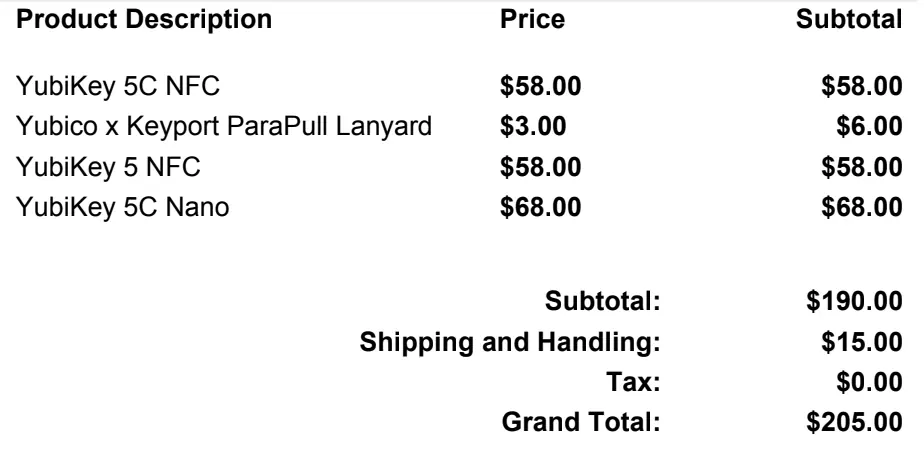
Figure 2: 3 YubiKeys and a strap, total cost 32,154 JPY including shipping.
- For my home desktop
- For my portable laptop
- A spare for carrying around
To have a 3-key system. Considering the risk of forgetting a YubiKey and being unable to work for hours or days, an extra 10,000 yen is cheap!
It was shipped from Sweden and arrived in about 6 days (surprisingly fast).
You will be billed separately for import consumption tax and customs advance payment fees by the courier (Yamato Transport) upon delivery, so be prepared (It cost me 3,000 JPY).
Creating GPG Keys & Saving to YubiKey
You can migrate existing keys, but I created new ones this time.
The master key is isolated on an offline USB memory stick, and only the “Signing (S)”, “Encryption (E)”, and “Authentication (A)” subkeys were written to the YubiKey.
I’ll omit the detailed steps here as anyone can ask an AI how to do it.
Setting up Agent Forwarding (for Nix users)
I often work remotely, so I wanted a setup where I can SSH from a PC with a YubiKey inserted to a PC without one, and continue working. This configuration was the only part I got stuck on.
The solution was to configure Home Manager to dynamically switch SSH_AUTH_SOCK.
  home.file.".gnupg/public_key.asc".source = ./public_key.asc;

  home.activation = {
    importGpgKeys = lib.hm.dag.entryAfter [ "writeBoundary" ] ''
      $DRY_RUN_CMD ${pkgs.gnupg}/bin/gpg --import ${config.home.homeDirectory}/.gnupg/public_key.asc

      # Trust the key ultimately (using full 40-char fingerprint)
      FPR="<your key fingerprint here>"
      echo "$FPR:6:" | $DRY_RUN_CMD ${pkgs.gnupg}/bin/gpg --import-ownertrust
    '';
  };

  # Use gpg-agent as SSH agent
  services.gpg-agent = {
    enable = true;
    enableSshSupport = true;
    defaultCacheTtl = 3600; # Cache TTL for GPG operations (Sign/Encrypt). Resets on use.
    defaultCacheTtlSsh = 3600; # Cache TTL for SSH operations (GitHub access, etc). Resets on use.
    maxCacheTtl = 10800; # Absolute max TTL for GPG. Requires re-entry after this time regardless of usage.
    maxCacheTtlSsh = 10800; # Absolute max TTL for SSH. Requires re-entry after this time regardless of usage.
    pinentry.package = if pkgs.stdenv.isDarwin then pkgs.pinentry_mac else pkgs.pinentry-qt;
  };

  # Point SSH_AUTH_SOCK to gpg-agent in zsh (only if not agent forwarding)
  # Without this, SSH authentication via GPG fails on macOS, breaking forwarding (SSH_AUTH_SOCK becomes /private/tmp/com.apple.launchd.XXXX/Listeners)
  programs.zsh.initExtra = lib.mkAfter ''
    # Use gpg-agent only if SSH agent forwarding is not active
    if [[ -z "$SSH_CONNECTION" ]] || [[ "$SSH_AUTH_SOCK" == *"/gnupg/"* ]]; then
      export SSH_AUTH_SOCK="$(gpgconf --list-dirs agent-ssh-socket)"
    fi
  '';
Registering YubiKey for GitHub and Google 2FA
- GitHub: You can register it from Settings -> Password and authentication -> Security keys.
- Google: You can register it from Account Settings -> Security -> Passkeys and security keys -> Create a passkey.
What I Gave Up On
I gave up on using the iOS app Pass to decrypt passwords by tapping the YubiKey via NFC.
- Reason:
When I tried to scan the YubiKey via NFC, I got a
Failed to decipher dataerror. This seems to be caused by the app misrecognizing the encryption subkey, as reported in this issue, and I couldn’t find a workaround. - Alternative: I created a separate software key (RSA 4096) dedicated to the iPhone and imported it only there. I compromised by separating this from the YubiKey operation.
Summary
It hasn’t been long since I introduced the YubiKey, but I am very satisfied so far. I feel like I can use YubiKey in many other situations, so I’d like to try various things in the future. That’s all for now. Thanks for reading!